How it works
Collection forms, step by step
A link of yours after sending
Give a form, or your project's own page, one link of yours with its own words, such as "Book again" or "Back to our site", and the thank-you screen offers it after the private link to withdraw permission and any reward, opening in a new tab. It is the same for everybody who writes, whatever they wrote, and nothing is counted when it is pressed. It is not shown on a kiosk's shared screen.
Your questions, not ours
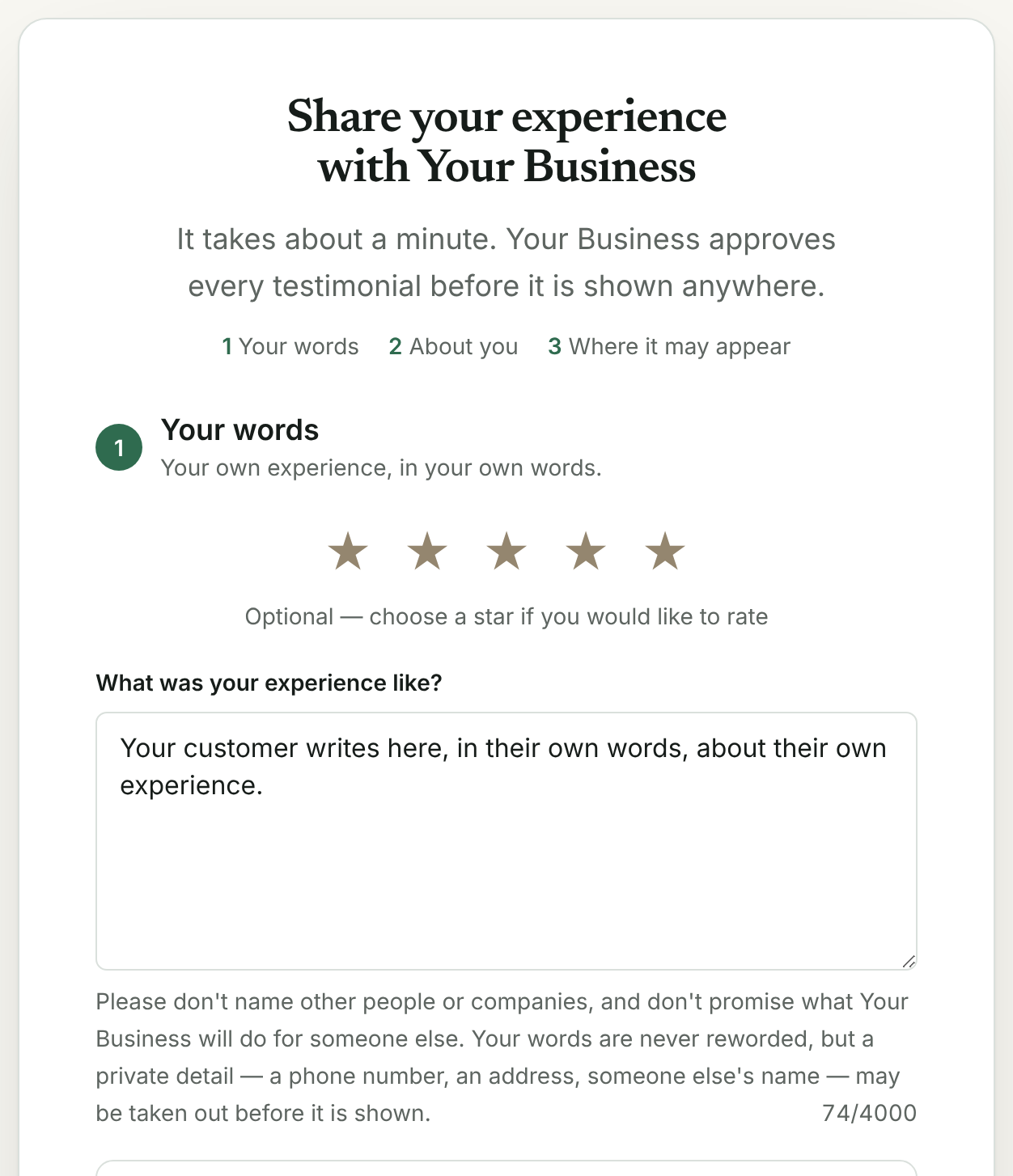
Every question sits on one page, so nobody is clicked through a sequence. You write the prompts; the person writes the answer. Nothing is pre-filled with praise, and there is no field anywhere that a model has typed into on your customer's behalf.
Text or video, their choice
The recorder runs in their own browser — no application to install and no account to make. A written answer takes about a minute; a recording takes as long as they want to talk.
The permission is part of the form
They check off where you may show it: your website, your social media, your advertising. What they checked off is stored beside the words and travels with them everywhere afterward.
As many forms as your plan carries
One on Free, five on Starter, fifty a project on Pro, your project's own page included — a different set of questions for a different service, a different client type, a different language.
Three questions drafted from your goal, if you want them
In the form editor, write one sentence about your business and what you want to learn, and press Draft questions. Three drafts that ask for facts — what changed, what it was like before, what they would tell a friend — land in the editor for you to change or delete. Nothing is on the form until you save it, and each press counts as one of the month's AI readings.
Or inside your own app or site
One script tag, and your own code calls window.hazelsong.ask() at the moment a customer finishes something — the order went through, the project was delivered, the course was done. The same form opens in a dialog on your page: a real modal that takes the keyboard's focus, closes with Escape or its Close button and hands focus back, with the page behind it out of reach while it is open. Pass the customer's name and address and they are filled in; they travel after the # of the form's address, so they never reach a server log. A button of yours with data-hazelsong-ask opens it too, and ?button=1 adds a small "Leave a testimonial" button in the corner.
What they type is kept on their own device
A testimonial is often started on a phone between two other things. The words, the name, the role and company, the stars, the score and the answers to your questions are kept in the writer's own browser as they type, for seven days from their last change, so closing the tab does not lose them. When they come back the form says "We kept what you wrote on this device" and offers "Clear what I typed". Their email address, photos, video and permission are never kept this way, and the draft is deleted the moment they send.
Sent twice, it arrives once
When a phone loses its connection just as Send is pressed, the writer cannot tell whether it went. Sending the same words again is safe: the page sends the same attempt with them, and a testimonial that already arrived is answered as it was the first time — with the same withdrawal link and any prize already drawn — without a second testimonial, reading, thank-you email, webhook or count. A second press while the first is still on its way is asked to wait a few seconds.
One entry in the visitor's browser, on your own site
To keep from asking the same person over and over, the script keeps one entry in the visitor's browser, in your own site's storage: when the dialog was last shown or closed, and whether they sent a testimonial through it. No identifier, no name, nothing sent to us. It keeps that entry only once your site says the visitor agreed — hazelsong.consent(true) from your consent banner, consent=granted on the tag, Google Consent Mode, or consent=not_required where your visitors' law asks none — and until then ask() returns false, because a reminder it cannot keep would ask the same person on every page; force: true opens it anyway and stores nothing. While it says the dialog was shown in the last 30 days (cooldownDays changes that, never below a day), ask() does nothing and returns false; once they have sent one, ask() does not open it again on your site unless your code passes force: true, and the corner button is no longer drawn for them. A visitor who presses your button has asked to write, so that is not held back.
After sending, a review site of yours, offered to everybody
Add up to three review sites to a form, or to your project's own page — Google, Trustpilot, G2 or Capterra, each with the address that site gives you for reviews. The thank-you screen then asks "Would you also post this on Google?", with a Copy your words button that copies exactly what they wrote and a link that opens the site in a new tab, in the embedded dialog too. It is shown to every writer whatever stars or score they gave, it is never shown where a reward was offered, and the only thing counted is that a link was opened, as a step of the form on your report.
One page with your review sites, for everybody
The review sites you add to your project's own page are also on one page of their own, /r/<your project>/reviews — or /reviews on your own subdomain or domain, where your plan carries one — beside a link to your form, to print on a receipt or send to anybody: "Write a review on Google", each with that site's rules for reviews. Every visitor sees the same page. Nothing is asked before they choose, nothing is counted, and it is drawn from the same copy your walls are drawn from.
A labeled link, and its QR code
On Your forms, give a link a label for the place you hand it out — "Receipt QR", "Email signature", "Packaging insert", up to 40 characters — and choose the page it opens. It is that page at its own address with ?via= and the label's id after it, and your report counts the same five steps for each label as for the form: opened, started, media added, sent, a review site opened. Each has a QR code drawn in your browser, to download as an SVG or a PNG for print. Up to 50 a project.
Kiosk mode, for a stand or a front desk
Add ?kiosk=1 to the page — Your forms makes the link — and one tablet collects from one person after another. After the thank-you it counts down 20 seconds (you can choose 10 to 120) with a Start now button, then opens an empty form: no words, name, email, stars, answers, photo or recording of the last person, and the permission unchecked again. Nothing is kept on the device, the screen asks the browser to stay awake, and a form nobody touches for 3 minutes asks whether anybody is still there, then starts over. The email address stays optional.
An interview, question by question
Choose "An interview for a case study" when you make a form, and write 3 to 8 questions — your own, or drafted from your goal. Each is answered by typing or by a recording of up to 60 seconds, the voice alone or a video, with the same recorder as the rest of the form. What arrives is one testimonial with one permission: the answers in order, each under its question, and wherever it is published the questions are labeled as yours. The typed answers are read for risk together, in one reading; a recorded answer is not read, and its card says so.
How far people get, question by question
Your report lists, for each form, how many visits reached each of its questions — the first time the question's field was touched — then the recorder and the permission box, with how many of those visits went on to send. The form editor links to it. The steps of one visit are sent together, once, and each is one of the month's counted events.
Your own release, beside the permission
On a form of your own, paste a paragraph of yours — an authorization your lawyer wrote, an image release — of 40 to 1,500 characters. The person must check it as well as the permission, or nothing is sent. Its exact words, its version and the time they agreed are kept with the testimonial, shown on its card, put in your export and printed on its record. Change the words and the form carries a new version; testimonials already written keep the one their writer agreed to.
Safe by design
The rule that makes it safe to have
Clear boundaries
What it will not do
Every capability page ends with this list. It is the part that says what you are actually buying.
- It will not change the link after sending by what the person wrote, their rating or their score, and it will not add anything to your address or count who pressed it.
- It will not write the testimonial, or suggest one, or finish somebody's sentence for them.
- It will not accept a testimonial with no permission recorded — there is no path through the form that skips it.
- It does not make your customer sign up for anything.
- It will not draft a question that asks for praise or for a number. The instruction says so, and a check in code drops any draft with a word like amazing, love, best, great, incredible or excellent, or a figure, whatever the model wrote.
- It will not open the dialog by itself — not on a timer, not on page load, not when somebody scrolls or moves to leave. It opens when your own code calls it or your visitor presses a button that asks for it.
- It will not ask again somebody who sent a testimonial through it on your site, unless your code says so in as many words.
- It will not follow your visitor: no cookie, no identifier, nothing read from your page, and its one entry stays in their browser on your site.
- It will not keep the ask's reminder in a visitor's browser before your site says they agreed, and a refusal removes it. Your own button that asks to write always opens the form.
- It changes nothing about consent inside the dialog. The permission checkbox, the promise and the way the reward is disclosed are the same words as on the page itself.
- It will not let another site put the form or your dashboard in a frame. Only the form's own embed view may be framed, by any secure site; your hosted wall stays framable, as the embed guides say.
- It does not send anything you have not submitted. What a writer types is kept in their own browser until they press Send, and you never see a draft.
- It does not keep the email address, a photo, a video or the permission on the writer's device, and it gives the permission back unchecked every time.
- It will not offer a review site only to the people who rated you well. Google, Trustpilot, G2 and Capterra all forbid choosing who is asked by what they are likely to say, and the rule that decides is never told the stars or the score.
- It will not offer a review site to somebody who was offered a reward for writing. Google and Trustpilot do not allow reviews written for one, and G2 asks to be told of any.
- It will not offer Yelp, which asks businesses not to ask for reviews.
- Its page of review sites will not ask for a rating first, send some visitors to one site and others to another, or say anything of a reward: it is the same page for everybody.
- It will not post anything for anybody, add a parameter to your link, pass it through an address of ours, or record which site was opened or by whom.
- It does not write your release, review it or vouch for it, and nothing here is legal advice. Whether it does what you need is between you and your lawyer.
- It will not let your release stand in for the permission Hazelsong asks, or narrow or widen where the words may appear. It is asked for as well, never instead.
- It will not take testimonials without a figure: each plan carries a month of arrivals through your collection pages, shared by your projects, and past it the page tells the person writing, in words, that you are not taking new ones there until the month turns. Nothing they typed is sent or lost, imports and the API are not counted against it, and nothing you hold is touched.
- It will not hold more than the plan's testimonials: fifteen a project on Free, and on the paid plans the figure on the pricing page, shared by your projects. Past it nothing new is stored and nothing is deleted; you delete some, or move up.
- It will not store new testimonials or files on the free plan past the ceiling the paying customers cover: two free accounts for each live paid subscription. When it is full, a free project keeps everything it already holds, the person writing is told in words that the page is not taking new testimonials for now and keeps what they typed, and imports and the API say the same to you.
- A labeled link is never a redirect of ours and never somebody else's address: it is your own page with a label on it, and the QR code is that address and nothing else.
- A label counts steps, never people. No cookie, no identifier and no pixel come with it, and a label that is not one of your project's own counts nothing under any label.
- In kiosk mode it does not keep anything on the device — not a draft, not a name, not the permission — and it offers no copy button, review site or post to the next person's accounts on the thank-you screen.
- Kiosk mode is not a lock. One kiosk screen sends at most 30 testimonials an hour, counted in the page's memory, so a reload starts a new count; locking the device to the page, with Guided Access on an iPad or app pinning on Android, is what keeps it a kiosk.
- Kiosk mode does not run inside the dialog on your own site: the embed view is a page in somebody else's frame, and a stand needs a page of its own.
- An interview will not show a question as something your customer wrote: wherever it is published, each answer sits under your question, and the questions are labeled as yours.
- An interview answer is typed or recorded, never both: a recording takes the place of what was typed beside it, and what was typed is not sent.
- An interview will not offer its recordings where you published the version with parts removed. A part taken out of the words could be said again in a recording, so only the text with the removals is shown.
- An interview is held to the 4,000 characters any testimonial is, questions included, and a recorded answer to 60 seconds.
- Counting how far people get does not record what anybody typed or chose, which answer they gave, or who they are: it is a number per question, per form and per month, and only for questions the form asks.
- It will not store the same send twice. Words changed before sending again are a new testimonial, which the same-words check still points out when the words match.
Where it lives in the code: lib/interview-rules.ts · lib/question-funnel-rules.ts · lib/forms.ts · app/f/[formSlug]/page.tsx · app/r/[slug]/page.tsx · app/api/ai/questions/route.ts · lib/ai-filters.ts · app/ask/[slug]/route.ts · lib/embed-ask.ts · proxy.ts · components/AskEmbedPanel.tsx · lib/form-draft.ts · components/CollectionForm.tsx · lib/review-links.ts · lib/release-rules.ts · components/ReviewLinksEditor.tsx · lib/collection-links.ts · lib/qr.ts · app/api/links/route.ts · components/CollectionLinksPanel.tsx · lib/kiosk.ts
Questions
Asked about this
From Help, where every answer is written from the product as it runs.
How do I log in? I never set a password.
There is no password. Your dashboard link is the way in — bookmark it. A new project starts with private hosted pages. Confirm the email for that project, then choose Publish public pages under Walls and widgets. Email confirmation replaces the original dashboard link; keep the new one. That is deliberate: nothing to forget, nothing to phish, and nothing of yours to leak in somebody else's breach. If you lose the link, the page at /access sends a one-time login link to the address on the account, and to no other address; it works once, for fifteen minutes, and opens every dashboard that address can reach.
What is the very first thing to do?
Send your form link to three customers who already like you. Not a list of two hundred — three. You will learn more from the first three answers about which of your questions are working than from any amount of planning.
How long does it take my customer?
About a minute in writing. A video takes as long as they talk. They do not make an account, install anything, or download anything.
Can I change the questions?
Yes, and you should. The defaults are a starting point; the questions worth asking in your trade are on the page for your trade.
This is running now
Open a project and use it. Nothing on this page is a roadmap.